Skip to content
DIAVICON

3D model · BIM/IFC

The structural diagnosis, element by element, in the 3D model

Upload the structure's model in .IFC or .GLB, with photogrammetry, and link each element to the tested member. DIAVICON colors the model according to the results of the tests and the visual inspection: you see where the problem is before opening any table.

Freemium plan: free, with 1 user and 250 MB of storage. The platform interface is currently in Portuguese.

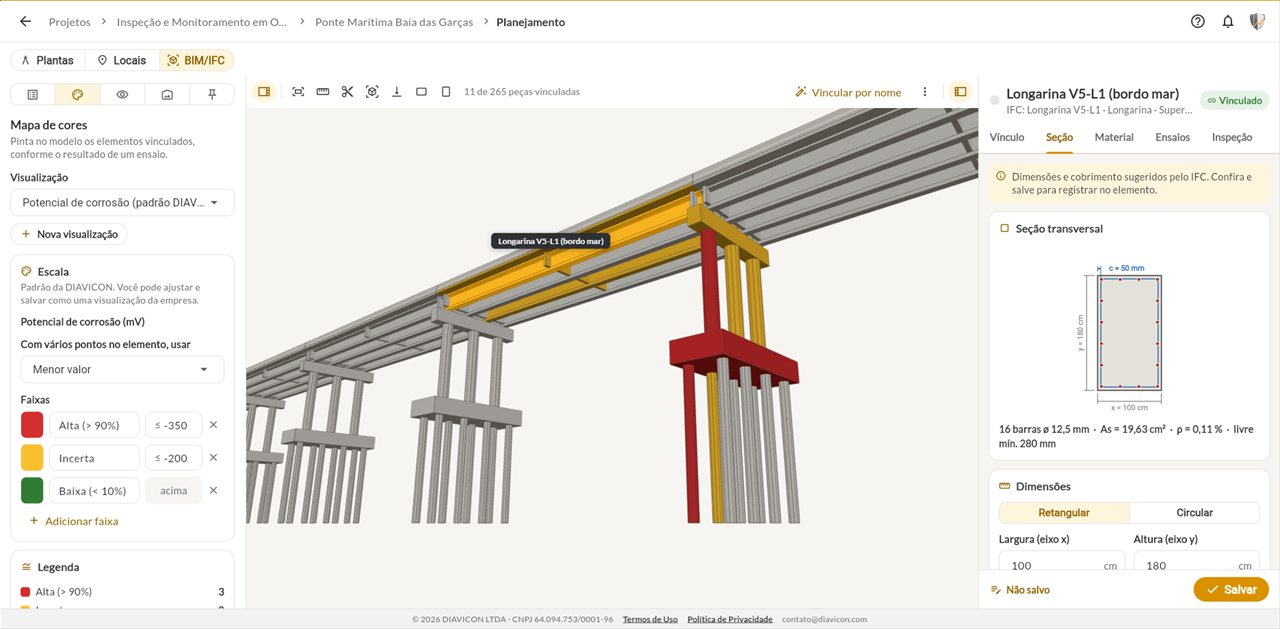
BIM/IFC model of a bridge on the DIAVICON platform, with piers, cap beam and pile cap colored by corrosion potential and the remaining service life panel for a pier

The DIAVICON difference

What the 3D model shows that a spreadsheet doesn't

Each element of the model carries the tests, inspections and service life forecast of the structural member it represents.

Color map

The structure colored by the test result

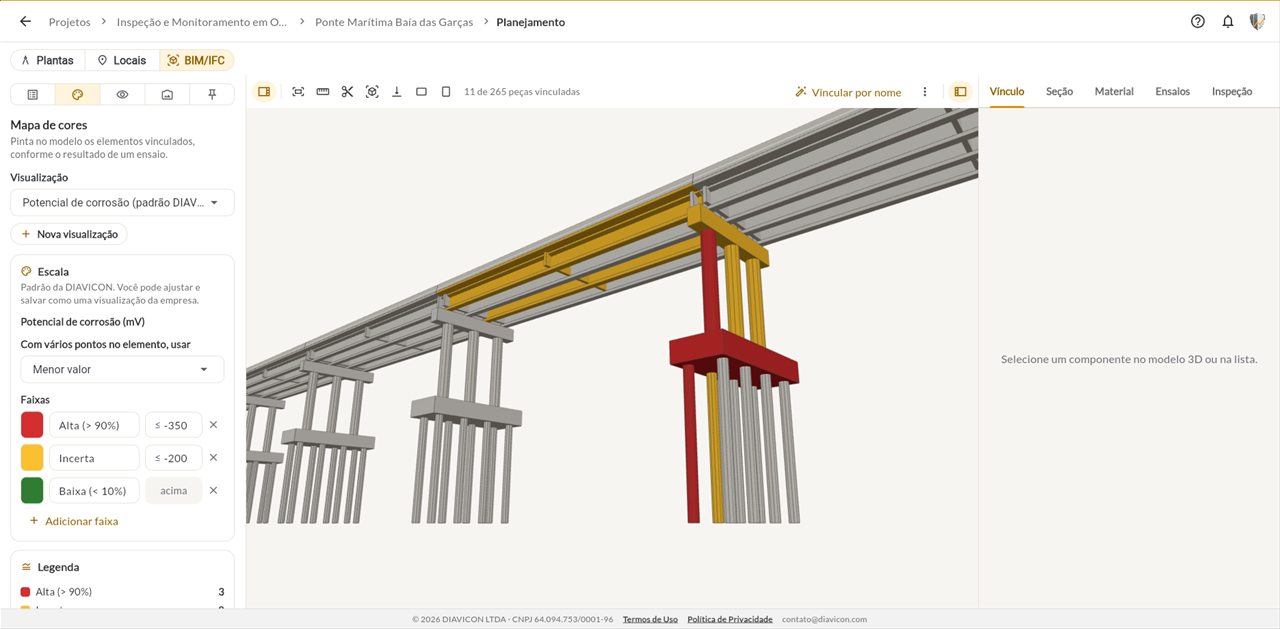
Choose a view and the model is colored according to the result of each element: corrosion potential, the GUT score from the visual inspection and the other recorded tests.

  • DIAVICON default ranges and colors, which your company can adjust and save
  • Criteria for elements with several points, such as lowest value or sum
  • Legend with the count of elements per range
3D model of a bridge on the DIAVICON platform with the elements colored by probability of corrosion: high, uncertain and low

Tests

Remaining service life with one click on the element

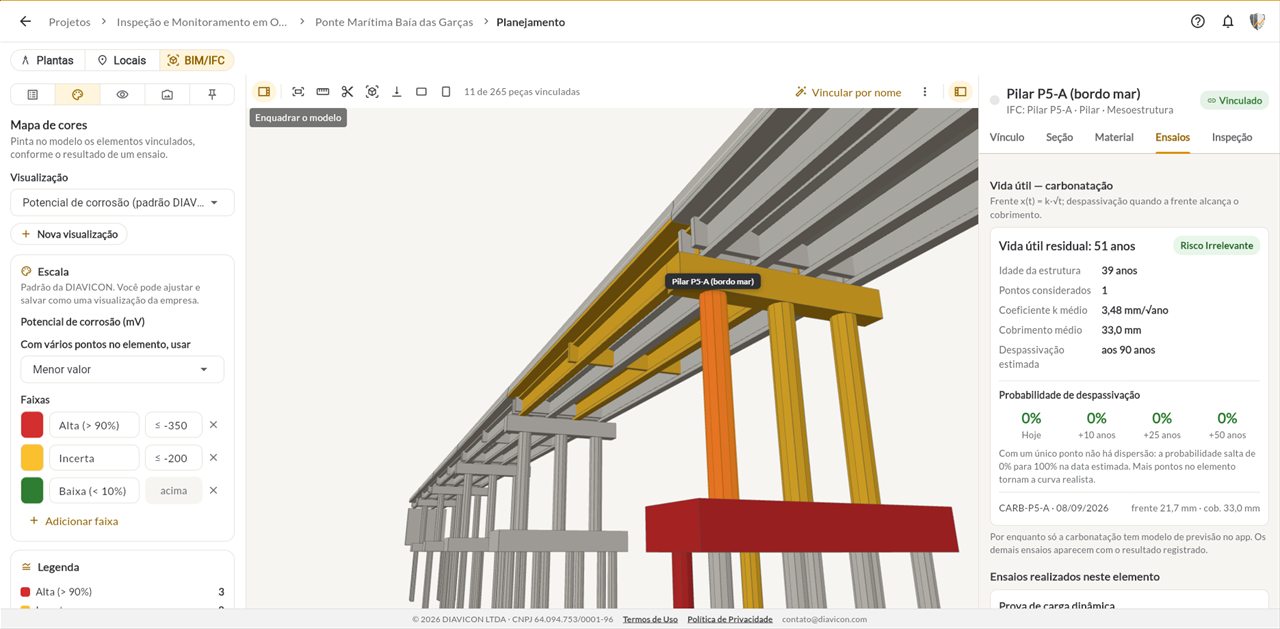
Select a pier, a girder or a slab and see the tests performed on that element, with the service life forecast based on the carbonation front.

  • Remaining service life and estimated year of depassivation
  • Probability of depassivation today and in 10, 25 and 50 years
  • List of the tests performed on the element
Tests panel of a pier selected in the 3D model, with a remaining service life of 51 years and the probability of depassivation
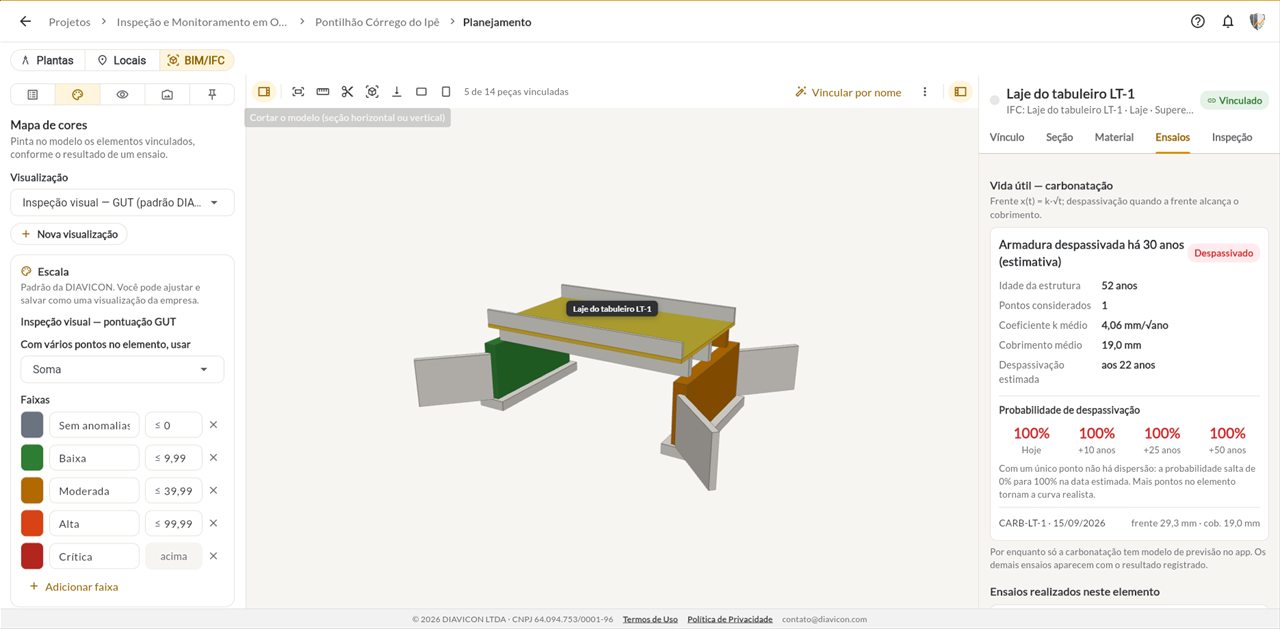
3D model of a small bridge colored by GUT score, with the deck slab flagged as depassivated

Visual inspection

The defects of each element in the model

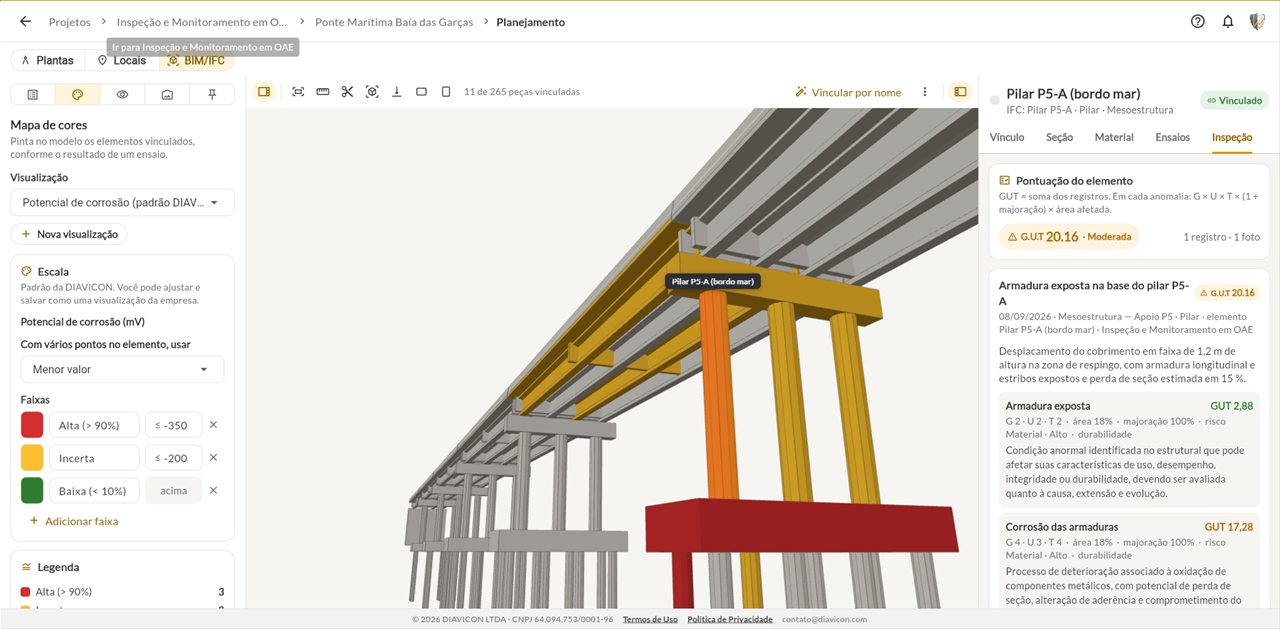
Visual inspection records appear on the corresponding element, with the element's GUT score and the description of each defect.

  • GUT score summed per element
  • Records with date, location and photos
  • Gravity, urgency and trend of each defect
Explore visual inspection
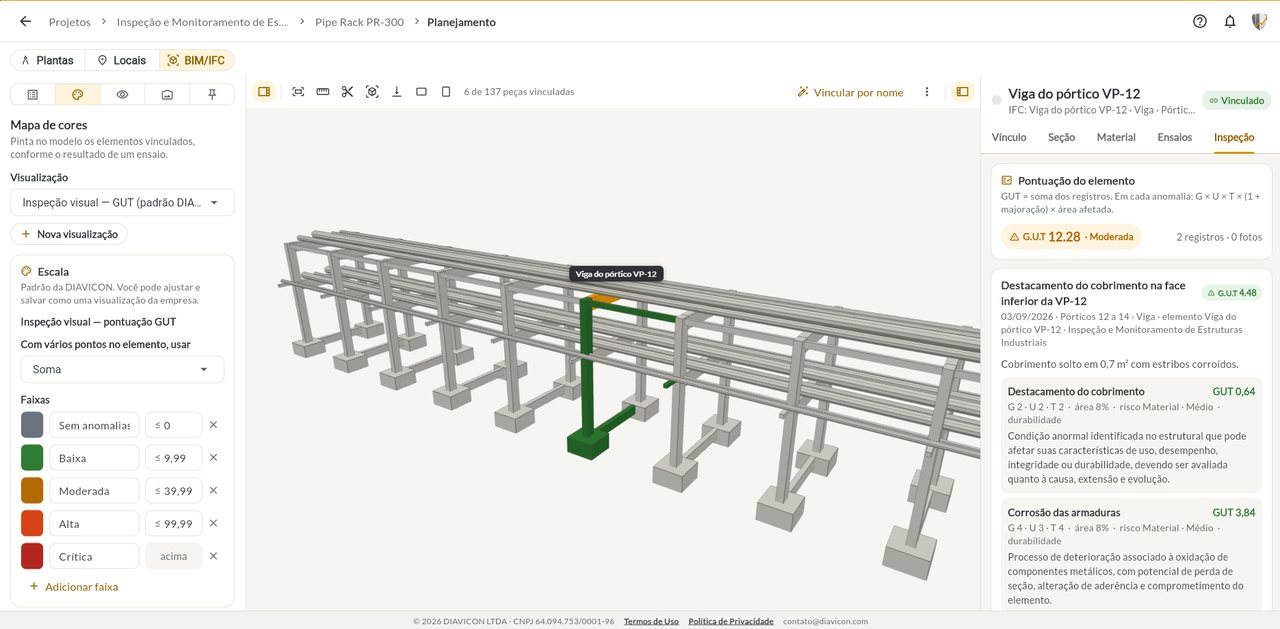
Inspection tab of a pier in the 3D model on the DIAVICON platform, with the GUT score and a record of exposed reinforcement

Section and material

Section, reinforcement and concrete cover from the IFC

The dimensions and concrete cover suggested by the IFC file fill in the element's record. You review and save.

  • Cross-section with the position of the bars
  • Dimensions, concrete cover and reinforcement ratio
  • Linking of model parts to elements, including by name
Cross-section of a girder obtained from the IFC model on the DIAVICON platform, with dimensions, bars and concrete cover

Bridges and industry

From the bridge to the pipe rack

The same feature works for bridges and viaducts and for industrial structures, in concrete and in steel: what changes is the model you upload.

  • Pipe racks, with frames and pipe supports
  • Warehouses, with steel trusses, columns and floors
  • Bridges, viaducts, small bridges, cut-and-cover structures and tunnels
See industrial structures
3D model of a pipe rack on the DIAVICON platform, with a frame beam highlighted and the inspection records
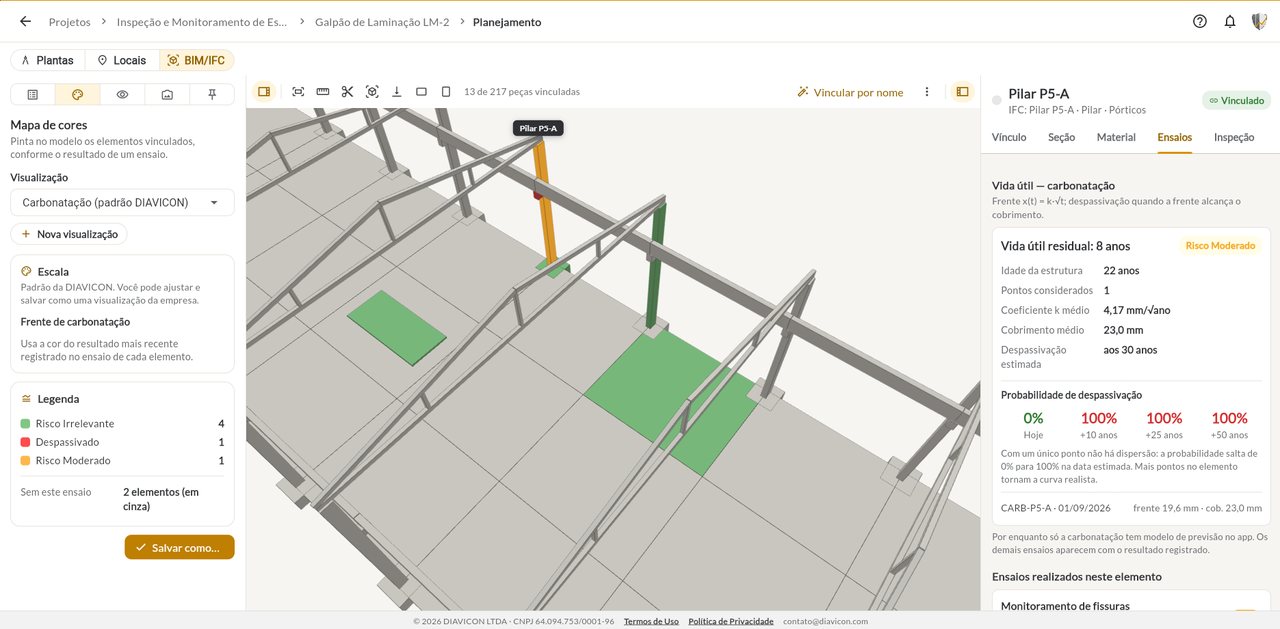
3D model of an industrial warehouse colored by carbonation risk, with the remaining service life of a column

In the field

The same model on your phone

In the app, the 3D model sits in the BIM/IFC tab of the structure's planning, next to the drawings and locations.

  • Rotate, frame, measure and section the model
  • Color map and component panel
  • The same account as the web platform
Explore the mobile app
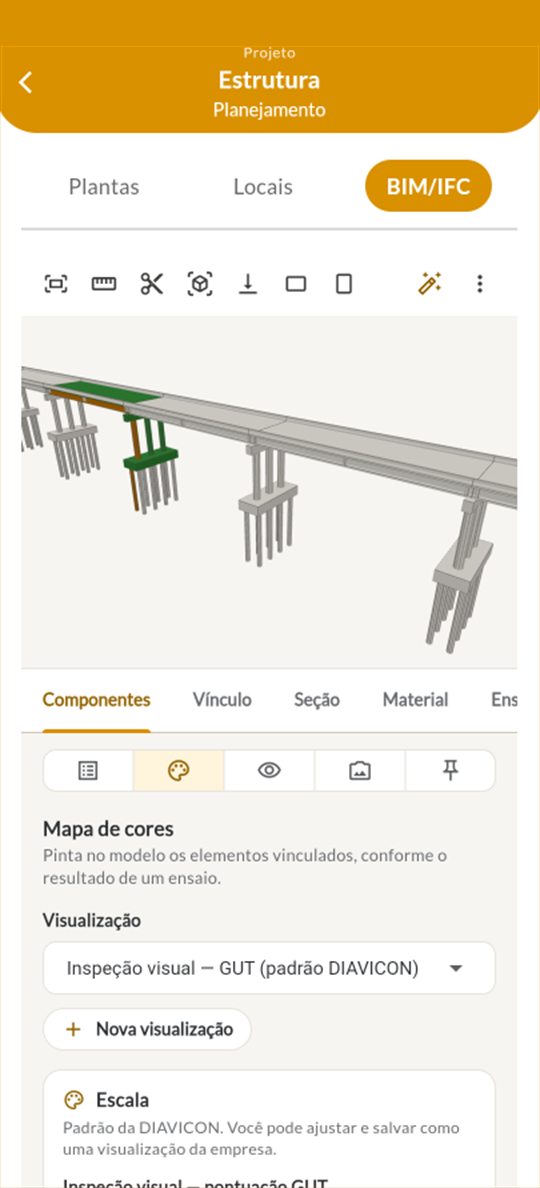
BIM/IFC model of a bridge in the DIAVICON app, with the elements colored by the GUT score from the visual inspection

Features

What you can do with the 3D model

.IFC and .GLB files

The structure's BIM model and the photogrammetry mesh in the same environment.

Linking to elements

Link each part of the model to the DIAVICON structural element, one by one or by name.

Company views

Adjust ranges and colors and save the view to use on other structures.

Sections and measurements

Cut the model with a horizontal or vertical section, measure and frame the area of interest.

Service life forecast

The measured carbonation front becomes remaining service life and probability of depassivation per element.

From the model to the dashboard

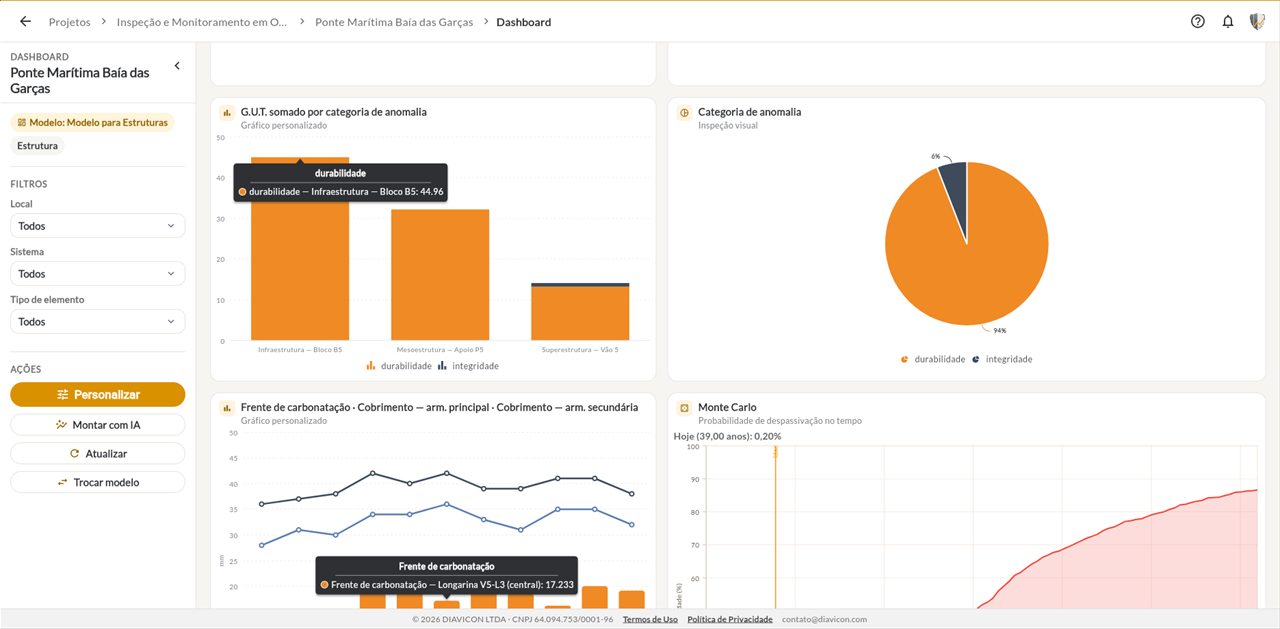
The same results feed the structure's dashboards and reports.

Monitoring

From the 3D model to the monitoring dashboard

The model shows where each result is; the dashboard shows how they evolve from one campaign to the next. Both use the same data collected in the field.

Explore the monitoring dashboard
Monitoring dashboard of a bridge on the DIAVICON web platform

Free trial

Start on the Freemium plan and upgrade when you need to

The structure's 3D model (.IFC and .GLB, with photogrammetry) is part of the Enterprise plan. Start on the Freemium plan to get to know data collection and analyses, and talk to DIAVICON to see the 3D model working with one of your structures.

Compare all plans
DIAVICÃO, the DIAVICON mascot, using the platform on a laptop

Freemium plan

Free

  • 1 user
  • 250 MB of storage
  • Full analyses
  • Online use only
Try it free

Demo

See the 3D model working with one of your structures

In a 30-minute call, we show you the 3D model, the dashboards and the AI reports, and answer your questions about the Enterprise plan.

  • BIM/IFC model colored by the test results
  • Remaining service life per element
  • Dashboards and AI reports
  • No commitment

We use your data only to respond to this request. Privacy policy.

Questions

Frequently asked questions about the BIM/IFC 3D model

DIAVICÃO, the DIAVICON mascot, wearing a headset and providing support on a laptop

Didn't find your question?Write to contato@diavicon.com.

What is the DIAVICON BIM/IFC 3D model?

It is the visualization of the structure's three-dimensional model inside the platform. Each part of the model is linked to a structural element and shows the tests, inspections and service life forecast for that element.

Which file formats does the platform accept?

.IFC files, the open standard for BIM models, and .GLB files, used for 3D models and photogrammetry meshes.

How is the model colored?

You choose a view, such as corrosion potential or the GUT score from the visual inspection, and each linked element takes the color of the range its result falls into. Your company can adjust and save the ranges.

Does the platform estimate the structure's service life?

For the carbonation front, yes: using the age of the structure, the measured front and the concrete cover, the platform estimates the remaining service life and the probability of depassivation for each element. Interpretation remains with the engineer in charge.

Do I need a BIM model of the structure?

To use this feature, yes: you need an .IFC or .GLB file of the structure. The other DIAVICON features, such as drawings, tests, dashboards and reports, work without the 3D model.

Which plan includes the 3D model?

The Enterprise plan, which includes 20 users, 30 GB of storage and the monitor for up to 20 structures.

Does the 3D model work on mobile?

Yes. In the app, it sits in the BIM/IFC tab of the structure's planning, with the color map and the panel for each component.


See your structure in 3D, with the results in the right place

Create a free account to explore the platform or book a demo of the Enterprise plan.

Try it free
DIAVICÃO, the DIAVICON mascot, giving a thumbs up

Follow us

Technical content and DIAVICON news.

Free Freemium plan Try it free